Monitoring Settings
Monitoring Items Settings
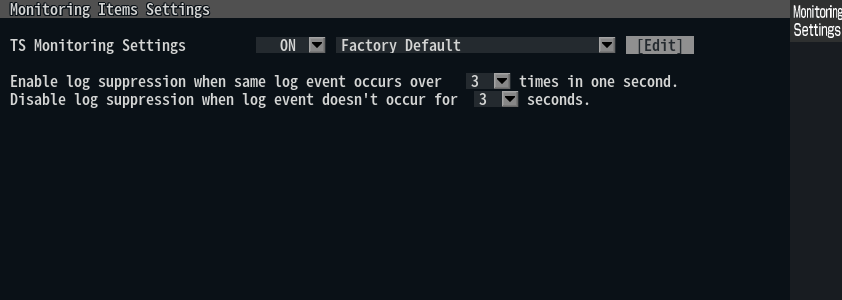
| Item | Description |
|---|---|
| TS Monitoring Settings |
|
| Log Suppression | Set conditions to suppress the occurrence of a large number of logs. Suppression processing can be turned on or off for each individual monitored item. |
TS Monitoring Settings
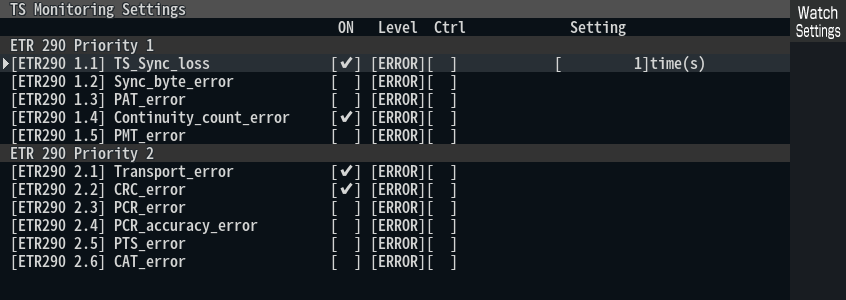
| Item | Description |
|---|---|
| ON | Checking a checkbox enables monitoring |
| Level | Set the log level (Error, Warning, Info). |
| Ctrl | Set log suppression processing ON/OFF. |
| Parameter | Set the threshold etc. (Varies depending on item) |
Info
For details on monitoring items, please refer to the Monitoring Items Reference.
Metrics Settings
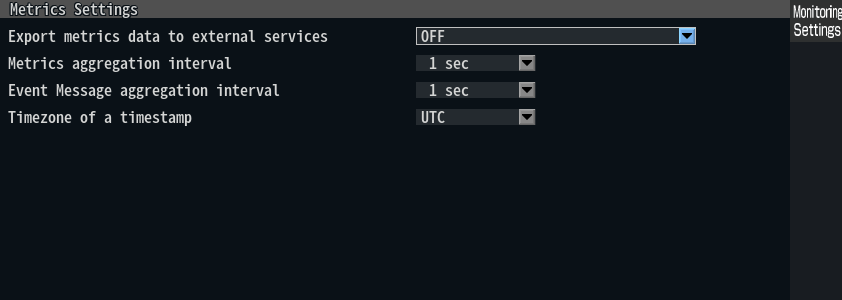
| Item | Description |
|---|---|
| Export metrics data to external services | Select the service to which you want to send the metrics. |
| Metrics aggregation Interval | Selects the time interval for aggregate metric calculations (average, maximum, and minimum). |
| Event log aggregation Interval | Selects the time interval for aggregate calculation of event logs (cumulative number of occurrences/recavers). |
| Timezone of a timestamp | Select the time zone to be used for timestamping metrics |
Info
For details on metrics, please refer to Metrics Reference.